 |
Thank You for using our Online Payment Option
We want to make sure you have no problems paying for, and receiving your termite report. Follow the directions below and you'll have your report downloaded to your computer in a SNAP! |
|
First off you will notice at the bottom of the page a "Pay Now" button. Next, You'll Click the Paypal button, and enter your payment information. You will then be sent back to retrieve your report.
|
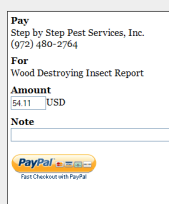
When you click the "Pay Now" button you will see a page that looks like this...
Just type the address of the report you are paying for in the notes.
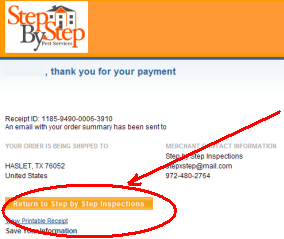
When you are finished entering your payment information, you will be looking at a screen like this..
Make sure to click the "Return to Step by Step Inspections" Button So you can retrieve your report! If you have any problems, you can call us at: (972) 480-2764 or contact us.
|